How the scam works
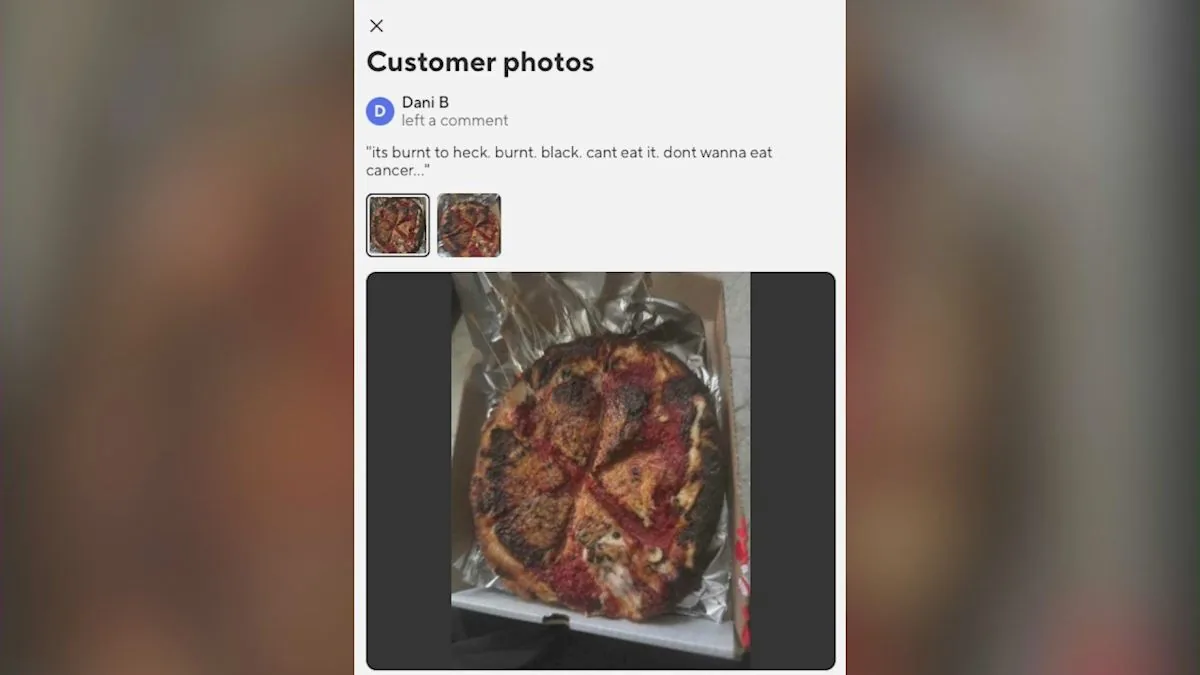
LOS ANGELES, CA — A Los Angeles pizzeria says it was targeted by a refund scheme that used an AI-generated photo to make a normal order look ruined. The customer ordered through DoorDash, then sent in a picture of what appeared to be a badly burned pizza and asked for a full refund.
The restaurant owner, Rhonda Reynolds of Masa of Echo Park, said the image did not match how her kitchen prepares food. She checked the photo with an app that flagged it as likely AI-generated, then reviewed security video from the order and saw the pizza leave the oven looking normal before it was boxed for delivery.
That kind of scam can work because many businesses rely on customer photos and quick refund decisions to settle complaints. A convincing image may be enough to trigger an automatic response before anyone has time to compare it with the order record, kitchen video, or the restaurant’s own packaging and preparation process.
The warning signs
- The complaint is built around a photo instead of a clear explanation of what went wrong with the order.
- The damage shown in the image looks extreme, but the business has no signs that anything similar happened in the kitchen.
- The customer pushes hard for a fast refund without giving the seller time to check records or footage.
- The picture looks unusually polished, oddly distorted, or inconsistent with how the product is normally prepared.
- The story changes when the seller asks for proof such as order details, packaging photos, or delivery records.
- The person is mainly focused on getting money back rather than fixing the problem through normal customer service steps.
If you've already paid or shared information
- Contact your bank, credit card company, or payment app right away and ask what dispute or fraud steps are available.
- If you use the same password on multiple accounts, change it now and make each account password unique.
- Turn on alerts for new charges, transfers, or account changes so you can catch additional misuse quickly.
- If you shared login details, customer data, or business account access, reset those credentials immediately.
- Review recent transactions and save screenshots, order records, receipts, messages, and any images tied to the claim.
- Report the incident to the Federal Trade Commission at ReportFraud.ftc.gov and, if needed, to the platform where the claim happened.
How to protect yourself
- Keep clear records of orders, receipts, delivery confirmations, and any photos taken before food or merchandise leaves your business.
- Use security cameras or other internal checks when possible so you can compare complaints against what actually happened.
- Train staff to flag claims that depend only on a suspicious image or an unusually aggressive refund demand.
- When a customer reports a problem, ask for specific details and compare them with the order, packaging, and delivery timeline before paying out.
- Be cautious with unfamiliar image files or links, since scammers may use them to pressure businesses or hide manipulation.
- For consumers, take your own photos right away if a delivery arrives damaged, and save the original packaging and order confirmation.
The bottom line
This case shows how a fake photo can be used to pressure a business into paying a refund it does not owe. It also shows why older fraud defenses, like checking records and comparing details, still matter even when the scam uses newer technology.
For restaurants, retailers, and customers alike, the safest response is to slow down, verify the claim, and keep documentation. A convincing image is not proof on its own, especially when the details do not match the order.